I need help configuring the Firefox browser

Discussion Of All Legal Topics Is Fine Anything Goes. Be Respectful of Others. No Personal Information or Attacks.
All Traffic, Link, Banner, Push Notification and Advertising, Offers & Requests Here,.
Domains & Websites For Sale and Requests Here.
Keep One thread per person & No More Than 1 Weekly Bump.
Post Reply
User avatar
kuprum
Verified Member
Verified Member
Posts: 8963
Joined: July 2nd, 2018, 4:20 am
Referrals: 1
Contact:

I need help configuring the Firefox browser

#1

Post by kuprum » October 16th, 2026, 1:45 pm

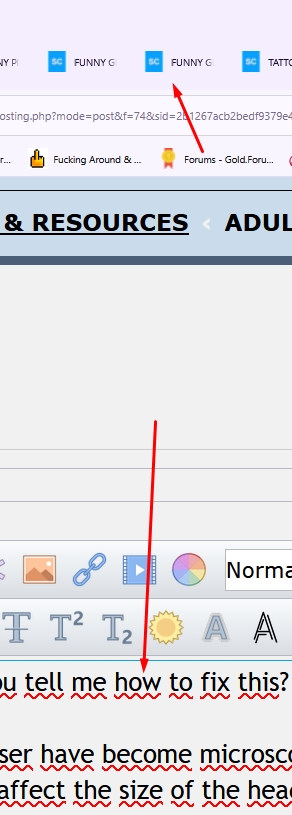
Guys, I need some help. Could you tell me how to fix this? It just happened out of nowhere.

The headings in the Firefox browser have become microscopic, while the text within the browser itself has remained the same. Changing the font doesn't affect the size of the headings—they stay the same. Thanks! d64bvjh

Image
Image

User avatar
TheButcher
Administrator
Administrator
Posts: 17517
Joined: February 2nd, 2018, 11:48 am
Title: I like weekends
Referrals: 1
Contact:

#2

Post by TheButcher » October 16th, 2026, 2:23 pm

Kuprum I found this on the Mozilla support site.

https://support.mozilla.org/mk/questions/1471044

User avatar
kuprum
Verified Member
Verified Member
Posts: 8963
Joined: July 2nd, 2018, 4:20 am
Referrals: 1
Contact:

#3

Post by kuprum » October 16th, 2026, 4:35 pm

Following the advice in the link... I had to reinstall the browser, which resulted in the loss of some data. The problem persists....
Image

User avatar
TheButcher
Administrator
Administrator
Posts: 17517
Joined: February 2nd, 2018, 11:48 am
Title: I like weekends
Referrals: 1
Contact:

#4

Post by TheButcher » October 16th, 2026, 4:37 pm

kuprum wrote: ↑
October 16th, 2026, 4:35 pm
Following the advice in the link... I had to reinstall the browser, which resulted in the loss of some data. The problem persists....
Sorry to hear that, quick question do you open a lot of Windows, I know when I have 15 or so they start getting smaller for me.

User avatar
gotonudecom
Verified Member
Verified Member
Posts: 3168
Joined: February 6th, 2018, 1:54 pm
Title: DomainMaster
Referrals: 30
Contact:

#5

Post by gotonudecom » October 16th, 2026, 7:53 pm

close some tabs and let me know if they get bigger as you close them.

JPDomains
Verified Member
Verified Member
Posts: 466
Joined: March 12th, 2018, 7:28 pm

#6

Post by JPDomains » October 16th, 2026, 8:52 pm

gotonudecom wrote: ↑
October 16th, 2026, 7:53 pm
close some tabs and let me know if they get bigger as you close them.
That will do it 34ddww


Eroticart
Verified Member
Verified Member
Posts: 251
Joined: March 30th, 2024, 5:02 am

#7

Post by Eroticart » October 17th, 2026, 8:12 am

which version of FF are you using?


User avatar
kuprum
Verified Member
Verified Member
Posts: 8963
Joined: July 2nd, 2018, 4:20 am
Referrals: 1
Contact:

#8

Post by kuprum » October 17th, 2026, 11:17 am

gotonudecom wrote: ↑
October 16th, 2026, 7:53 pm
close some tabs and let me know if they get bigger as you close them.
done.

That doesn't make a difference. I’m on the latest version of FF: 158.0.

Anyway... I managed to fix it by tinkering with the text size settings in Windows (via the Windows 'U' [Ease of Access] menu). I have no idea why this glitch occurred between the FF update and Windows. The solution turned out to be incredibly basic—almost silly—but it worked.

Thanks to everyone for your concern. Hugs! t34x12
Image

User avatar
shoopa
Verified Member
Verified Member
Posts: 1850
Joined: February 26th, 2018, 7:32 pm

#9

Post by shoopa » October 17th, 2026, 10:46 pm

I have never run into this when updating Firefox, I'll keep this in mind if it ever happens to me.


I need help configuring the Firefox browser

Post Reply